
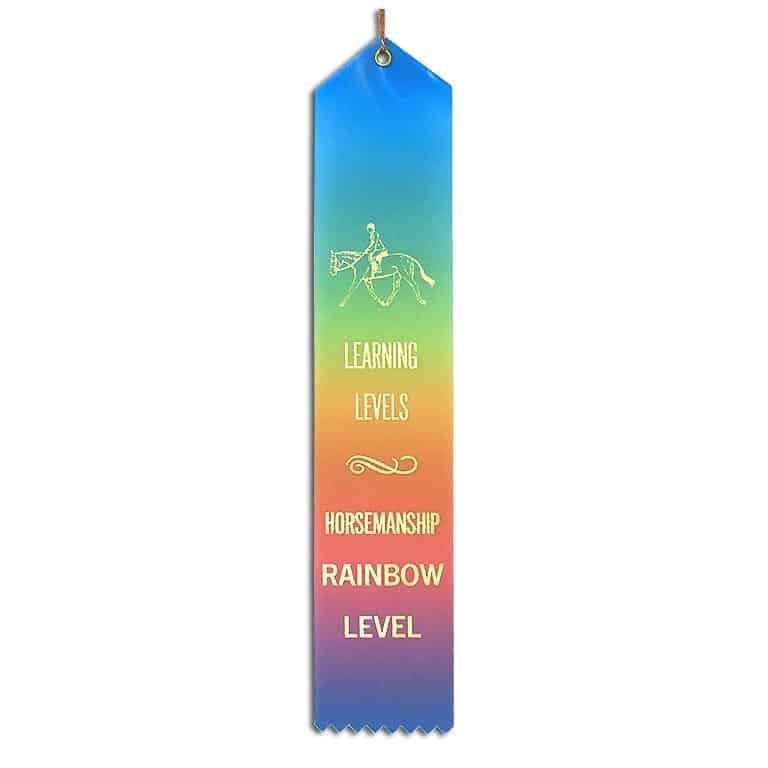
Rainbow Level Ribbons

Achievement ribbons for your introductory Rainbow Level students.

Rainbow Level Ribbons

Achievement ribbons for your introductory Rainbow Level students.

$2.25 $10.00
$2.25
Buy Now

LEARN MORE....

These simple, inexpensive Rainbow Level Horsemanship ribbons are a great way to motivate and reward your students’ progress through the Levels!

Available as a single flat satin ribbon or in packs of 5 ribbons, for students in English or Western lessons.

Each ribbon has a record card on the back so you can write “Yay for you!” – or equivalent – when awarding the ribbons to your students. There’s also an eyelet with a gold cord. Your students can hang their ribbons in a prominent place and bask in their achievements

Rainbow is a special introductory Level for your youngest students (typically age 4-7). Learn more about Rainbow Level and download our free Rainbow Level curriculum for mounted Green Level lessons.


RIBBONS MEASURE 2″ x 10″ (5.08 x 25.4 cm)

NOTE: The gradient colors on Rainbow ribbons may vary – it all depends on how our supplier cuts them. So please expect minor differences in the color progression.

For best results, make sure your device has a strong WI-FI or cellular signal before downloading large files.

PLEASE NOTE THAT REFUNDS ARE NOT AVAILABLE
FOR DIGITAL DOWNLOAD FILES.

Want us to let you know when new downloads are available?

Secure
STRIPE encrypted checkout

You'll get an email link
to download each PDF file

WHILE YOU VISIT OUR SHOP, WE’LL TRACK:
Location, IP address and browser type: we’ll use this for purposes like estimating taxes and shipping.
Shipping address: we’ll ask you to enter this so we can estimate shipping before you place an order, and send you the order.
We’ll also use cookies to keep track of cart contents while you’re browsing our site.

HOW LONG WE RETAIN YOUR DATA:
We generally store information about you for as long as we need the information for the purposes for which we collect and use it, and we are not legally required to continue to keep it. For example, we will store Shop order information for 3 years for tax and accounting purposes. This includes your name, email address and billing and shipping addresses.

WHAT WE SHARE WITH OTHERS:
We accept payments through Stripe. When processing payments, some of your data will be passed to Stripe, including information required to process or support the payment, such as the purchase total and billing information.

We don’t sell or give your data to any other third parties except as outlined on our Legal Stuff page Ever. Really.

We’ll cheerfully delete all of your stored personal data if you request it!

For detailed information about privacy and terms, check out our Legal Stuff page.

TIPS FOR DOWNLOADING PURCHASED PDFs

We offer downloadable PDF files as special purchases for digital versions of our books, select teaching resources and occasional promotional offers.

So how do you access and download your new PDF files?

#1 – DOWNLOAD THE FILE USING THE EMAIL LINK

When you purchase a PDF download from us, you’ll receive the link to download the file in an email message.

Make sure to whitelist our email address:
bossmares [at] horsesenselearninglevels.com
… and if you don’t see the email with 5 minutes, check your Spam/Junk/Promo folder!

Click on the link in that email to open the PDF file in your browser.

#2 – DOWNLOAD THE FILE FROM YOUR SHOP ACCOUNT

Purchasing anything from our Shop creates your shop account, using the username and password you created during checkout. (Note: LLPro members don’t need a separate shop account – just make sure you sign in with your membership username and password before checkout.)

When you are logged in, you can access your purchased PDF files at any time – just hover over the Shop item in the main menu and tap the My Shop Account link. On the Orders tab, hit the View button to bring up a link to your download file.

BOTH METHODS WILL OPEN THE DOWNLOAD FILE IN YOUR BROWSER

Depending on your browser settings, you’ll either see:

  • the opened document, which you must save to your device
  • a “Save As” browser notice asking you where to save the file
  • or, you browser may automatically save the file to a default folder on your device.

If you want to change how the file is downloaded, you’ll need to visit your browser settings for download files.

As always, let us know if you have any questions or issues with your order.